
This installation can send and receive mail for your own domains, on this machine, with nothing rented from anyone else. The packages are already on disk from the install, masked and inert; turning mail on is what configures and starts them.
Turning it on
Mail needs a name of its own - usually mail.your-domain - which
is picked from the names registered under
Domains, not typed freehand. The apex itself carries
the record that says where mail goes; the server answers to a host under it.
The panel derives the system address, postmaster@ your apex, and
tells you whether the name already points here.
Turning it on runs a staged install - packages, certificate, signing key, services, go live - each stage visible as it runs, each with what to do if it stops. An install that stopped part way resumes at the stage that stopped; finished stages are not repeated. It needs outbound port 25.
Giving a domain its mail
On the apex domain's Mail tab, Assign to mail server sets up its mailboxes, its signing key and its records. The tab then lists the six records that domain needs, each with its purpose and the consequence of leaving it out:
| Record | What it is for | Without it |
|---|---|---|
| Mail exchange (MX) | Tells the internet which machine accepts mail for this domain. | Mail sent here is rejected or silently dropped. |
| Sender policy (TXT) | Says only this machine may send mail as this domain. | Anyone can forge mail from your addresses, and yours lands in spam. |
| Signing key (TXT) | Lets a receiver check that a message really came from you and was not altered. | Receivers cannot verify your mail, so more of it is treated as suspicious. |
| Policy (TXT) | Tells receivers what to do with mail that fails the two checks above. | Failures are handled however each receiver feels like. |
| Reverse DNS (PTR) | Names this server as the owner of the address it sends from. | Large providers refuse mail from an address that does not name itself. |
| Client setup (CNAME) | Lets a mail client find its own settings from the address alone. | Nothing, but every client has to be set up by hand. |
With a DNS provider connected, Write these records creates the ones it can. Reverse DNS is not one of them: it belongs to whoever owns the IP address, which is your hosting provider, and has to be asked for.
Detaching a domain stops it accepting mail and is refused while mailboxes still live on it. Its records stay in the zone until you remove them.
Mailboxes, forwarders and lists
Each mailbox row also carries an auto-reply, its client settings, and a password change. Deleting a mailbox deletes what is in it, and mail sent to it afterwards is refused.
Client settings
What to tell a mail client: incoming mail over IMAP on port 993 with SSL/TLS, outgoing mail over SMTP on port 587 with STARTTLS, the user name is the full address, and the password is the mailbox password. Where the client setup record is published, most clients find all of that on their own.
Checking that it works
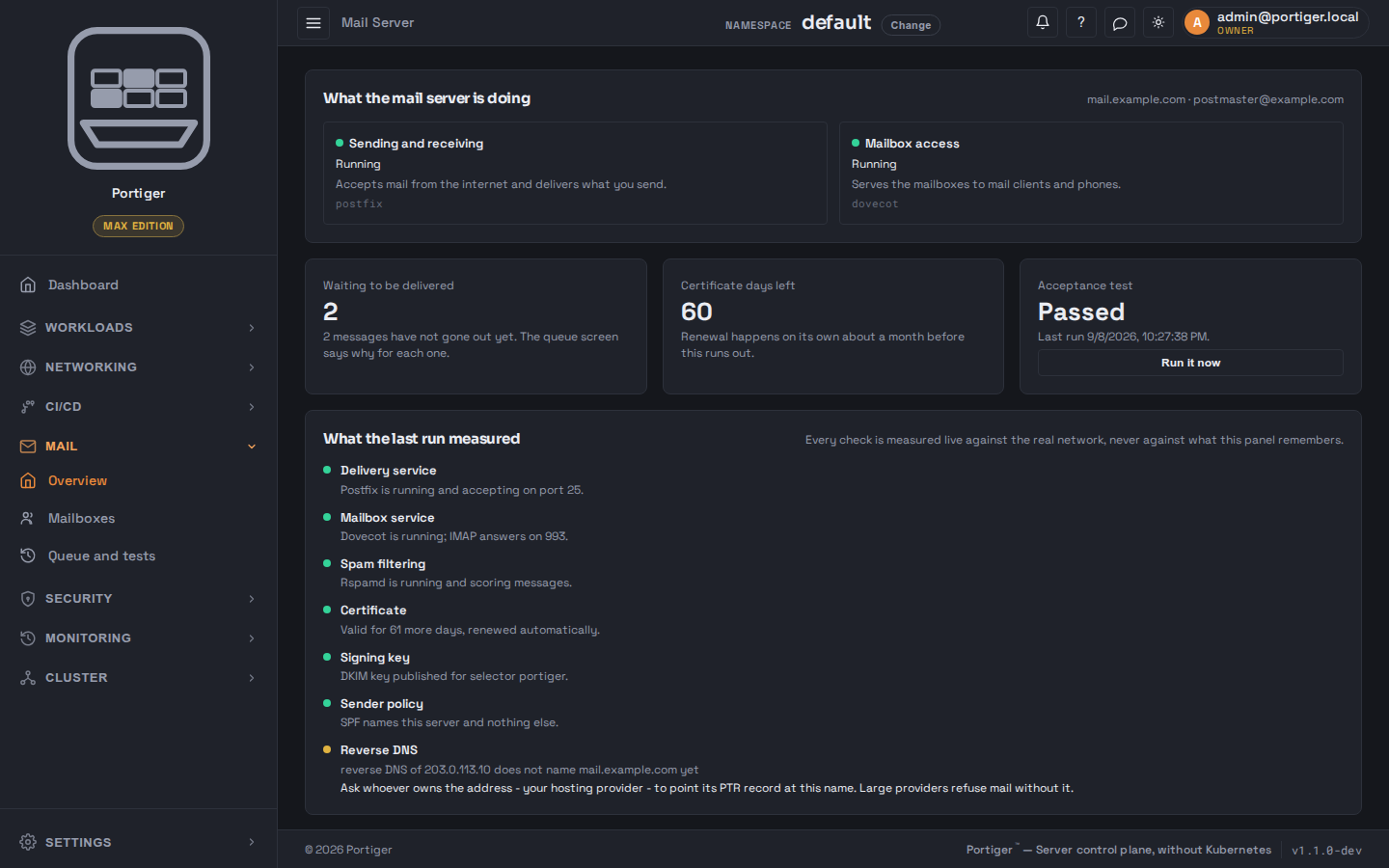
The acceptance test on the overview measures the things that decide whether mail actually arrives - the delivery service, the mailbox service, spam filtering, the certificate, the signing key, the sender policy and reverse DNS - live against the real network, never against what the panel remembers. Each check that fails says what to do.
Queue and tests sends one message from a mailbox here to an address you can read somewhere else, which proves the half this machine controls. Testing incoming mail cannot start here: publish the domain's records, send yourself a message from an account elsewhere, and open the mailbox. The queue on that page is mail this server accepted but has not handed over yet, with the reason for each - something sitting there for hours is worth reading.
The panel's own mail
Password resets and notifications go through whatever SMTP server the panel is configured with. Once your own mail server is running, one button points the panel at it. Until something is configured, the overview says plainly that the panel cannot send mail yet, so password resets and notifications go nowhere.
How much you get
| Plan | Mail domains |
|---|---|
| Community | Not included |
| Personal | 1 |
| Team | 5 |
| Max | Unlimited |
Mailboxes are not counted on any plan that includes mail.